

Settings → SLA in your OpenCX dashboard. Creating, editing, and deleting policies requires the SLA policies permission under Settings in Settings → Roles.
The three targets
Agent replies count whether they are sent from the inbox or from a connected helpdesk. A workflow reply counts only when Fulfill SLA is on in its Reply to ticket or Send macro step.
Create a policy
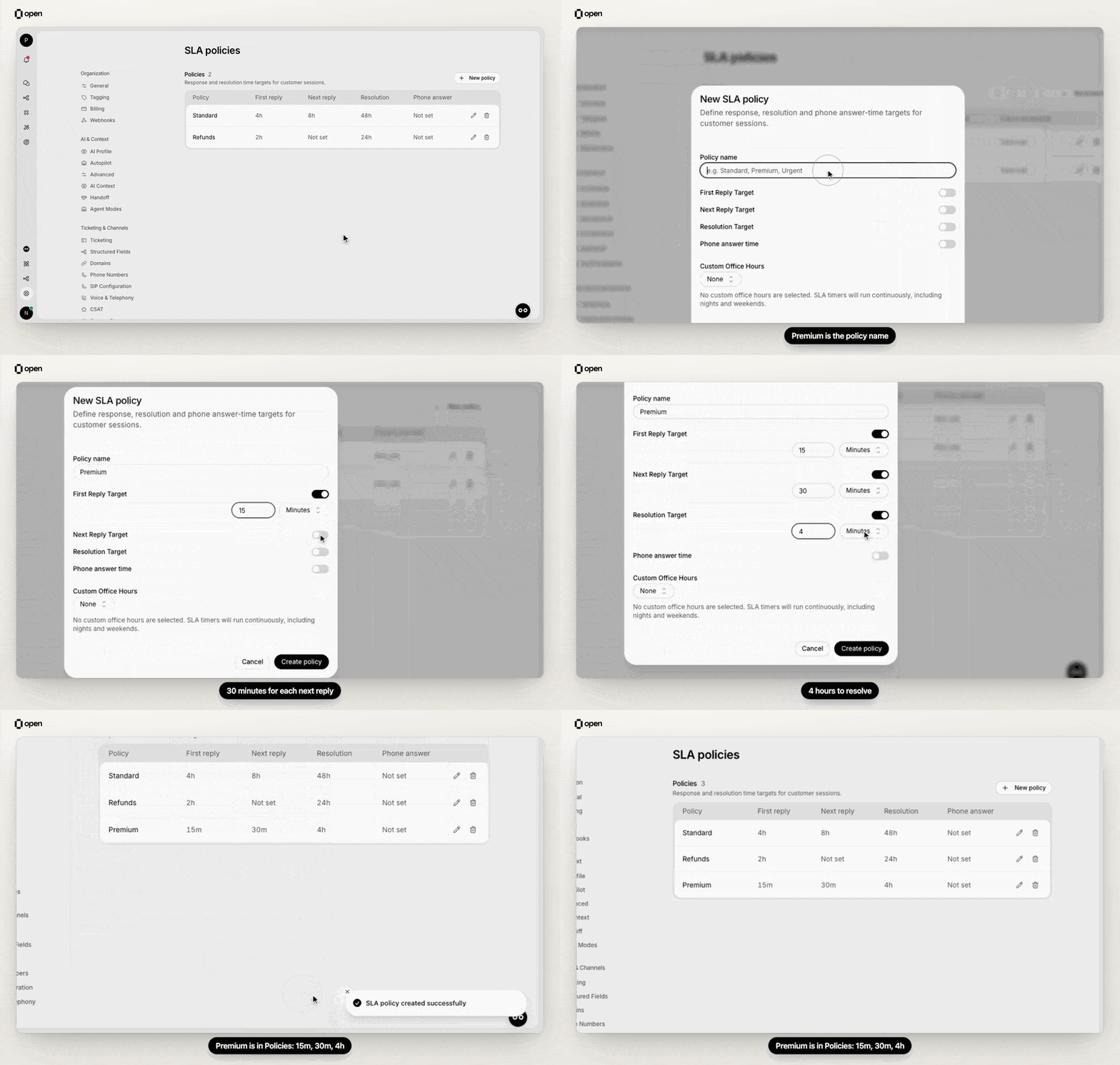
Create a Premium policy with 15 minute, 30 minute and 4 hour targets, and it appears in the Policies table.
1
Open Settings → SLA
Go to Settings → SLA and click New policy.
2
Name the policy
Enter a Policy name, such as Standard or Premium.
3
Set targets
Switch on First Reply Target, Next Reply Target, or Resolution Target, and enter a number in seconds, minutes, or hours. Set at least one target. A resolution target must be longer than both reply targets.
4
Choose office hours
Under Custom Office Hours, pick a schedule so timers pause outside business hours, or leave None so they run continuously, including nights and weekends.
5
Save
Click Create policy. The Policies table lists each target as Not set or as a duration.
How timers pause outside office hours
With a schedule selected, a timer only counts business time. A policy applied outside business hours starts counting when they next begin. Running timers pause when business hours end and resume when they start again; the session timeline shows SLA paused — office hours ended and SLA resumed — office hours started. If you edit the office hours schedule, deadlines already running are recalculated from the business time that has passed. If no schedules exist yet, the dialog links to office hours so you can create one.Apply a policy to sessions
Policies are applied with workflows. Teams do not apply session SLAs; a team only picks a phone answer-time policy.- Apply SLA sets a policy on a session. By default the step fails if the session already has an SLA. Turn on Replace existing SLA to swap it for this policy, for example when a session moves to a stricter lane; the new clocks start from now. Re-applying the same policy changes nothing.
- Pause SLA pauses the resolution timer, for example while you wait on the customer. It resumes when the customer replies or the session reopens. Time spent paused does not count.
What agents see in the inbox
- Countdown badge. Sessions with an SLA show a timer badge in the header and in the session list, counting down to the most urgent deadline. It turns amber within an hour of the deadline and red within 30 minutes. Hover it to see the policy name and each target: a countdown, met, breached, late (met after a breach), or paused.
- Sort. Sort a view by SLA Urgency to put the nearest deadlines first.
- Filter. Add the SLA Status filter and pick a metric (Any metric, First reply, Next reply, Resolution) and a status (Active, Breached, Fulfilled, Completed after breach, Paused).
- Timeline. The session timeline records when the SLA was applied, when each target started, was met, or was breached.
- Assignment. Teams that use SLA first assignment hand out the session with the earliest outstanding deadline first. See session assignment order.
What happens on a breach
When a deadline passes while the session is open, the target is marked breached and the timeline records it. A snoozed session wakes up. The SLA First Reply Breached, SLA Next Reply Breached, and SLA Resolution Breached workflow triggers fire, so you can notify a lead, raise priority, or reassign. A reply or close after the breach marks the target as completed after breach (late on the badge).Edit or delete a policy
Edits apply to timers that start afterwards; deadlines already running keep their original targets. Deleting a policy asks for confirmation and cannot be undone. Sessions that used it no longer have an SLA, and no further breaches are recorded for them.Analyze SLA performance
Use the SLA analytics API for compliance rates, response and resolution time percentiles, trends, breakdowns, and a breach heatmap.Troubleshooting
Related Documentation
Office Hours
Business hours that pause SLA timers.
Teams
SLA-first assignment order.
Phone Answer-Time SLA
Grade how fast callers are answered.
SLA Policies API
Manage policies programmatically.