> ## Documentation Index
> Fetch the complete documentation index at: https://docs.open.cx/llms.txt
> Use this file to discover all available pages before exploring further.
# Contact segments
> Group contacts with saved conditions, then use the segment to limit AI instructions, knowledge, and actions, branch workflows, or filter the contact list.
A segment is a saved set of conditions that groups contacts, such as "Pro customers in France". Use segments to open a filtered contact list, and to limit which contacts an AI instruction, knowledge document or action applies to.
> [!NOTE]
>
> **Contacts → Segments** in your [OpenCX dashboard](https://platform.open.cx/contacts/segments). The page has no sidebar entry: press ⌘K (Ctrl+K on Windows) and choose **Contacts > Segments**, or pick **Manage segments** in the view menu on the **Contacts** page. See [keyboard shortcuts](https://docs.open.cx/inbox/keyboard-shortcuts.md). Viewing segments requires the **Contacts** permission with **Read**; creating, editing and deleting them requires **Write**.
## Create a segment
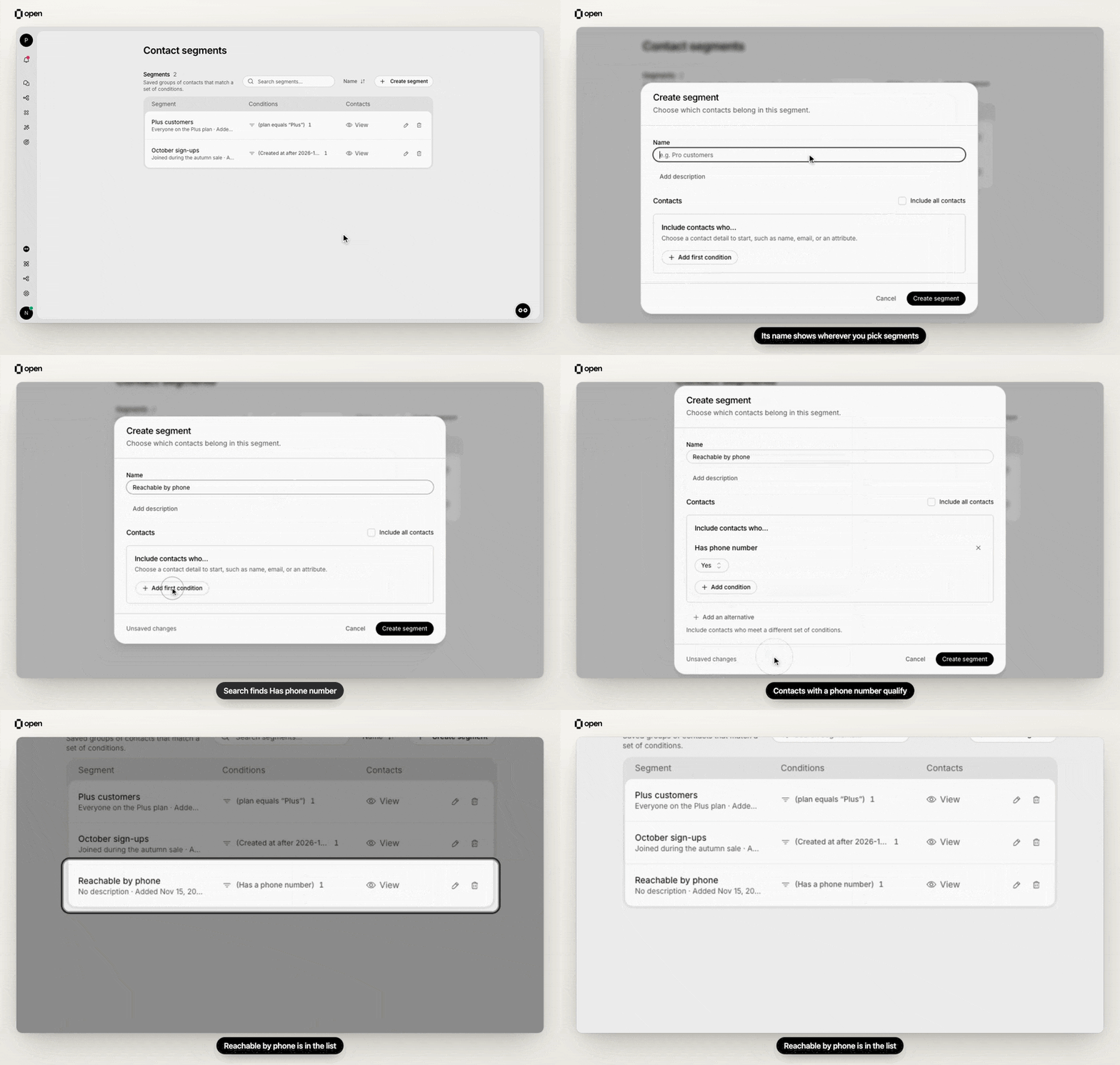
Create a segment named Reachable by phone with one condition, Has phone number, and see it in the list.
**1. Start a segment**
On **Contact segments**, select **Create segment**, enter a **Name**, and optionally **Add description**.
**2. Add conditions**
Select **Add first condition** and search for a condition. Use **Add condition** to add more; a contact must meet every condition in the section, shown as **Include contacts who…**.
**3. Add alternatives (optional)**
**Add an alternative** creates another way to qualify, shown as **Or include contacts who…**. A contact only needs to qualify for one alternative. For example, one alternative includes Pro customers in France and another includes VIP customers anywhere.
**4. Save**
Select **Create segment**. To put every contact in the segment instead, tick **Include all contacts**.
## Conditions you can use
| Condition | Group | Matches contacts by |
| - | - | - |
| **Contact attributes** | Contact details | A saved contact field, such as plan or country, that **equals**, **not equals**, **contains**, **exists** or **not exists**. Add more attributes to require all of them. |
| **Name** | Contact details | Names that contain any of the values you enter |
| **Email address** | Contact details | Specific email addresses |
| **Email domain** | Contact details | The domain in the email address |
| **Phone number** | Contact details | Full or partial phone numbers |
| **Has email address** / **Has phone number** | Contact details | Whether the contact has one (**Yes** or **No**) |
| **Created at** | Activity | When the contact was added, between an **After** and a **Before** date |
| **Last contacted** | Activity | When the contact last had a session |
| **Last contacted with handoff** | Activity | When the contact last had a session with a handoff |
| **Sequence participation** | Activity | Contacts who participated in a sequence |
| **Session attributes** | Activity | Exact key and value pairs saved on the contact's sessions |
| **Segment membership** | Status and membership | **Is in segment** or **Is not in segment** for another segment |
| **Blocked** | Status and membership | Blocked or not blocked |
| **Unsubscribed** | Status and membership | Unsubscribed or subscribed |
| **Contact IDs** | Advanced | Specific contact IDs |
For list conditions, use the add button for each extra value. An empty list matches no contacts. Date conditions need at least one bound, and the end must be after the start.
## How membership stays up to date
OpenCX saves who belongs to each segment and keeps it current in the background:
* **When you create a segment or change its conditions**, membership is worked out for every contact. Renaming a segment or changing its description doesn't trigger this. Right after saving, the contact list can still show the previous membership for a short time.
* **When a contact is created or changed**, by an agent, the API, the widget or a [CSV import](https://docs.open.cx/contacts/import-and-export.md), OpenCX checks that contact against every segment.
* **Membership isn't re-checked on a timer.** A contact's membership changes only at the moments above.
Conditions on **Session attributes** work differently when the AI replies: segments that use them are checked against the current session at that moment, so a restriction follows the session the customer is in rather than any past session.
## Where segments are used
| Feature | Where to set it | Effect |
| - | - | - |
| [AI instructions](https://docs.open.cx/ai-instructions/training-scenarios.md) | **Knowledge** → an instruction's **Instruction settings** → **Restrict by Contact Segments** | The instruction is used only for contacts in the selected segments. Leave empty to use it for everyone. |
| [Knowledge documents](https://docs.open.cx/knowledge/sources/overview.md) | A document's **Document settings** → **Restrict by Contact Segments** | The AI uses the document only for contacts in the selected segments. |
| [Actions](https://docs.open.cx/actions/build-an-action.md) | An action's **Action Settings** → **Restrict by Contact Segments** | Only contacts in the selected segments can trigger the action. Empty means all contacts. |
| [Workflows](https://docs.open.cx/api-reference/workflows/index.md) | **Check Contact In Segment** and **Add Contact to Segment** steps | Branch on whether a contact is a member, or add a contact to a segment. |
| [Contacts list](https://docs.open.cx/contacts/manage-contacts.md) | The view menu, or the **Segment** filter | Show only a segment's members. **View** on a segment's row opens this list. |
| Other segments | The **Segment membership** condition | Build a segment from, or excluding, another segment. |
| [Sequences](https://docs.open.cx/api-reference/sequences/index.md) (API) | The sequence's audience filter | A sequence audience sent through the API accepts the same segment membership condition. The dashboard's **Audience** tab doesn't offer it. |
> [accordion] Sessions with no known contact
>
> When a session has no contact, segment-restricted instructions, documents and actions don't apply, unless one of the segment's alternatives uses only **Session attributes** conditions and the current session matches them.
> [accordion] Adding a contact from a workflow
>
> **Add Contact to Segment** adds the contact directly. Segments are defined by their conditions, so the next membership check removes the contact again if it doesn't match them.
## View, edit or delete a segment
The **Segments** list shows each segment's name, description and the date it was added. Select the **Conditions** summary to see every condition and alternative. Use the search box to find a segment by name.
* **Edit**: use the row action to open the segment and select **Save changes**. Without **Write**, the same action opens a read-only **Segment details** view.
* **Delete**: select the trash icon and confirm. Contacts are kept; only the segment and its membership are removed. Instructions, documents, actions and workflows that name the segment are not updated, so review them first.
If a segment was created through the API with a condition this dashboard version can't edit, the editor keeps every condition unchanged and lets you edit only the name and description.
For the API, see [contact segments](https://docs.open.cx/api-reference/contacts/segments/introduction.md).
## Troubleshooting
| Symptom | Likely cause | Fix |
| - | - | - |
| "Add a condition or select Include all contacts." | The segment has no conditions | Add a condition, tick **Include all contacts**, or remove the empty alternative. |
| A contact you just edited isn't in the segment yet | Membership updates in the background | Wait a moment and reload the contact list. |
| A contact added by a workflow left the segment | The contact doesn't match the segment's conditions | Have the workflow set an attribute with **Merge Contact Custom Data**, and match on it with a **Contact attributes** condition. |
| An instruction or action never reaches some customers | They aren't in any selected segment, or the session has no contact | Check the contact's membership with the **Segment** filter on the contact list. |
***
## Related Documentation
> [card] [Segments API](https://docs.open.cx/api-reference/contacts/segments/introduction.md)
>
> Create segments and check membership.
> [card] [Training scenarios](https://docs.open.cx/ai-instructions/training-scenarios.md)
>
> Target instructions by segment.
> [card] [Build an action](https://docs.open.cx/actions/build-an-action.md)
>
> Restrict actions to segments.
> [card] [Manage contacts](https://docs.open.cx/contacts/manage-contacts.md)
>
> Filter the contact list by segment.
This documentation is built and hosted on [Mintlify](https://mintlify.com), a developer documentation platform.