> ## Documentation Index
> Fetch the complete documentation index at: https://docs.open.cx/llms.txt
> Use this file to discover all available pages before exploring further.
# Companies in the dashboard
> Browse the companies your contacts belong to, set account owners, and read session totals and sentiment per company. Use when working with B2B accounts.
A company is an account record that contacts belong to, such as one customer business with several people who contact you. The **Companies** pages list every company with its owner and attributes, and show how each account's sessions went.
> [!NOTE]
>
> **Companies** in your [OpenCX dashboard](https://platform.open.cx/companies). The page has no sidebar entry: press ⌘K (Ctrl+K on Windows) and choose **Companies**, or select a company name on a contact's companies card. See [keyboard shortcuts](https://docs.open.cx/inbox/keyboard-shortcuts.md). Viewing requires the **Companies** permission with **Read**, or **Assigned sessions** with **Read**. Changing the owner requires **Companies** with **Write**.
## How companies and contacts get linked
Companies come from your own systems. Each one is identified by its ID in your system, shown as **ID**, and a contact can belong to several companies. The dashboard shows companies and their contacts but doesn't create companies or link contacts; use one of these:
| Method | How |
| - | - |
| API | [Upsert a company](https://docs.open.cx/api-reference/companies/upsert.md), then [link a contact](https://docs.open.cx/api-reference/contacts/companies/link.md) or [link many contacts](https://docs.open.cx/api-reference/companies/bulk-link.md) by contact ID, email or phone. |
| Workflows | The **Create or Update Company**, **Link Contact to Company** and **Unlink Contact from Company** steps. |
| MCP | `upsert_company`, `link_contact_to_company`, `unlink_contact_from_company` and `set_company_owner`. See [MCP tools](https://docs.open.cx/mcp/tools.md). |
| Genesys | The organization of a contact's Genesys external contact becomes its OpenCX company. See [Genesys contacts and companies](https://docs.open.cx/integrations/genesys/conversations.md#contacts-and-companies). |
Contacts are never linked automatically by email domain. Linking needs a company that already exists; see the [companies API](https://docs.open.cx/api-reference/companies/introduction.md) for the rules.
## Find a company
The **Companies** list shows **Company**, **ID**, **Owner**, **Contacts** and **Added**. Select a row to open the company.
* **Search** by company name or ID.
* **Filters**: add **Owner** to show one teammate's companies or those with **No owner**, and **Attribute** to match a company attribute that **exists**, **not exists**, **equals**, **not equals**, **contains**, or is **before** or **after** a date. Every filter must match.
* **Sort by** **Default**, **Name**, **Contacts** or **Added**, or select a sortable column header.
* **Columns**: add attribute columns from the attributes on the loaded companies. Your choice is saved in this browser. Attributes pinned under **Pinned by your workspace** always show.
* **Contacts count**: select it to open the [contact list](https://docs.open.cx/contacts/manage-contacts.md) filtered to that company.
* **Export**: the download button saves the filtered companies as a CSV with name, ID, owner, owner email, contact count, date added and every attribute. One file holds up to 2,000 companies; a warning appears when the list is longer.
To pin company attributes for everyone, go to [**Settings → Workspace**](https://platform.open.cx/settings/workspace) → **Attribute display** → **Company attributes**. Pinned attributes lead the company page and the inbox companies card, and always show as columns on the companies list.
## Read a company's page
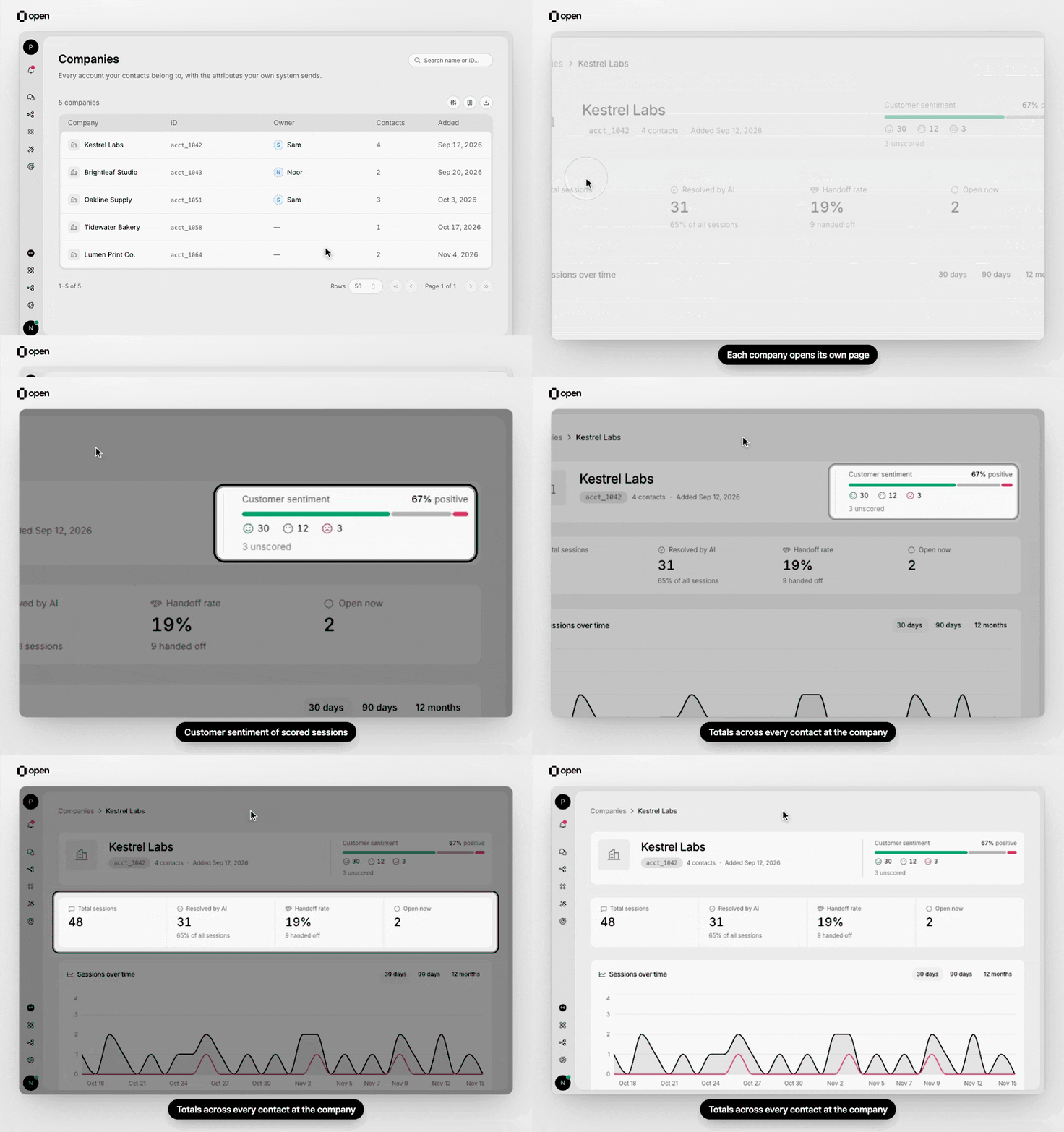
Open a company from the list to see its sentiment and its Total sessions, Resolved by AI, Handoff rate and Open now.
The company page shows the name, ID, contact count and date added, then:
| Section | What it shows |
| - | - |
| **Customer sentiment** | The share of scored sessions that were positive, neutral and negative. Sentiment is scored when the AI resolves or hands off a session; sessions closed by a person or a ticketing system are not scored. |
| **Total sessions** | Every session of every contact linked to the company, all time |
| **Resolved by AI** | Sessions the AI resolved, including ones where the AI answered and the customer didn't reply, with their share of all sessions |
| **Handoff rate** | Sessions handed off to a person, as a share of all sessions, with the count |
| **Open now** | Sessions currently open |
| **Sessions over time** | Sessions and handed-off sessions per day over **30 days**, per week over **90 days**, or per month over **12 months** |
| **Attributes** | The attributes your system sent with the company |
| **Owner** | The teammate who owns the account |
| **Contacts** | Linked contacts with **Name**, **Email** and **Added** (the date they were linked). Select one to open their contact page. |
A dash instead of a number means the total couldn't be loaded: hover it to see whether the company has too much history to total quickly, or the request failed and a reload may help.
## Set the owner
The owner is the teammate who looks after the account, such as an account manager. It shows on the company page, the companies list and the companies card in the inbox.
With **Companies** **Write**, open the company and pick a teammate under **Owner**, or choose **No owner**. Without it, the owner shows as read-only. You can also set the owner through the [API](https://docs.open.cx/api-reference/companies/set-owner.md) or the **Set Company Owner** workflow step. When a teammate leaves your organization, the companies they owned become unowned.
## Companies in the inbox
When a session's contact belongs to a company, the inbox sidebar shows a companies card with each company's name, ID, owner, other contacts and attributes. Select the company name to open its page. Agents who can read their assigned sessions can open company pages from there, even without the **Companies** permission.
## Troubleshooting
| Symptom | Likely cause | Fix |
| - | - | - |
| "No companies yet" | No company has been sent from your systems | Create companies through the API, a workflow or MCP. |
| A company shows "No contacts yet" | No contact has been linked to it | Link contacts through the API or a **Link Contact to Company** workflow step. |
| The **Owner** picker is read-only | Your role lacks **Companies** **Write** | Ask an admin to add it in **Settings → Roles**. |
| "Company not found" | The company was deleted or belongs to another workspace | Check the link, or search the companies list. |
***
## Related Documentation
> [card] [Companies API](https://docs.open.cx/api-reference/companies/introduction.md)
>
> Create companies and link contacts.
> [card] [Manage contacts](https://docs.open.cx/contacts/manage-contacts.md)
>
> Find and edit the people at each company.
> [card] [Segments](https://docs.open.cx/contacts/segments.md)
>
> Group contacts with saved conditions.
> [card] [Roles](https://docs.open.cx/security/roles.md)
>
> Grant the Companies permission.
This documentation is built and hosted on [Mintlify](https://mintlify.com), a developer documentation platform.